
.png)
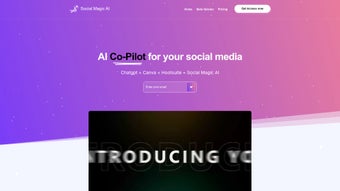
Description
Download Social Magic – AI‑Powered Social Media Management Tool
Overview
Social Magic AI is a cloud‑based platform that brings artificial intelligence to the heart of social media marketing. Designed for agencies, small businesses, and solo creators, the tool promises to cut down the hours spent brainstorming, drafting, and scheduling posts while simultaneously boosting engagement. By simply entering a single prompt, users can generate brand‑consistent copy, eye‑catching images, short videos, and compelling captions that are ready to publish across Facebook, Instagram, Twitter, LinkedIn, TikTok, and other major channels. The platform’s built‑in Ideas Laboratory sparks fresh content concepts, and a month‑long calendar lets you line up posts in advance, freeing you to focus on strategy rather than execution. Beyond creation, Social Magic AI delivers a real‑time analytics dashboard where you can monitor likes, shares, comments, click‑through rates, and audience growth. The data‑driven insights help you refine your approach, test new formats, and prove ROI to clients or stakeholders. Collaboration tools enable teams to assign roles, request approvals, and keep a clear audit trail, making the solution ideal for multi‑client environments. In short, Social Magic AI consolidates the functions of a content generator, scheduler, analytics suite, and collaboration hub into a single, secure web app that scales with your social media ambitions.
Key Features & Benefits
- AI‑Driven Content Generator – produce posts, images, videos, and captions with one prompt.
- Ideas Laboratory – curated brainstorming space for fresh campaign concepts.
- Multi‑Channel Scheduler – plan and auto‑publish up to 30 days across major social networks.
- Analytics Dashboard – track engagement, reach, clicks, and conversion metrics in real time.
- Team Collaboration – role‑based permissions, content approval workflow, and client portals.
- Brand Consistency Engine – enforce tone, style, and visual guidelines automatically.
- Content Library – store reusable assets, templates, and past posts for quick retrieval.
- Secure Cloud Hosting – GDPR‑compliant data storage with regular backups and SSL encryption.
Pros
- Significant time savings – generate months of content in minutes.
- High engagement potential – AI optimizes copy for each platform’s algorithm.
- All‑in‑one solution – eliminates the need for separate design, scheduling, and analytics tools.
- Scalable for teams – robust permission system supports agencies handling multiple clients.
- Data‑driven decisions – actionable insights help refine strategy on the fly.
Cons
- Reliance on internet connectivity – offline work is limited.
- Learning curve for AI prompt crafting – may require initial experimentation.
- Pricing tiers can be steep for very small freelancers.
- Limited native video editing features – best for short clips.
- Advanced analytics export options are currently in beta.
Installation & Usage Guide
Social Magic AI is a web‑based SaaS product, so there is no traditional installation process. Getting started is as simple as visiting the official website and creating a free account. After confirming your email, you’ll be taken to the dashboard where the onboarding wizard walks you through the essential setup steps:
- Connect Your Social Profiles: Authorize Facebook, Instagram, Twitter, LinkedIn, TikTok, and any other supported platforms. The OAuth flow is secure and requires only read/write permissions you grant.
- Define Your Brand Guidelines: Upload your logo, choose brand colors, and set tone‑of‑voice parameters. The AI uses this data to keep every piece of content on‑brand.
- Explore the Ideas Laboratory: Input keywords related to your niche, and the AI will suggest 10‑15 fresh post ideas, complete with suggested hashtags.
- Generate Content: Type a single prompt like “Summer sale for eco‑friendly apparel” and watch the tool produce a full post, image mock‑up, and caption ready for review.
- Schedule & Publish: Drag the generated assets onto the monthly calendar, set specific dates and times, and enable auto‑publish. You can also add team members to review content before it goes live.
- Monitor Performance: Once posts are live, navigate to the Analytics tab to view real‑time metrics, compare against previous campaigns, and export reports in CSV or PDF format.
For power users, Social Magic AI offers API access, allowing integration with existing CRM or marketing automation platforms. The platform also supports custom webhook triggers for events like “post published” or “engagement spike,” enabling advanced workflow automation. Regular updates are rolled out automatically, ensuring you always have the latest AI models and feature enhancements without manual intervention.
Compatibility & System Requirements
Because Social Magic AI runs entirely in the browser, it is compatible with any modern operating system that supports up‑to‑date web standards. This includes:
- Windows 10, 11 (any edition)
- macOS Catalina (10.15) and later
- Linux distributions with recent kernels and GNOME/KDE desktop environments
- iOS 13+ and iPadOS 13+ (via Safari or Chrome app)
- Android 8.0+ (via Chrome, Firefox, or the native WebView)
The platform is optimized for the latest versions of Chrome, Firefox, Edge, and Safari. For the best experience, we recommend a screen resolution of at least 1280 × 800 pixels and a stable broadband connection with a minimum download speed of 5 Mbps. While the service works on mobile browsers, the full feature set—including the content generator and analytics dashboard—delivers the richest experience on desktop browsers where the UI can display larger canvases and detailed charts without scrolling.
Security is a top priority. All data transmitted between your device and Social Magic’s servers is encrypted with TLS 1.3, and the platform adheres to GDPR and CCPA regulations. Users can enable two‑factor authentication (2FA) for added account protection, and administrators have access to audit logs that record every change made within the team workspace.
Frequently Asked Questions & Final Thoughts
Is there a free version of Social Magic AI?
Yes, Social Magic offers a limited free tier that includes 5 AI‑generated posts per month, basic scheduling for one social profile, and access to the Ideas Laboratory. It’s a great way to test the core functionality before committing to a paid plan.
How does the AI ensure brand consistency?
During onboarding, you upload brand assets and define tone, style, and voice guidelines. The AI model references this metadata each time it creates content, automatically applying your color palette, logo placement, and preferred phrasing to keep every post on‑brand.
Can I schedule posts for multiple accounts at once?
Absolutely. After linking each social account, you can select any combination of profiles when scheduling a post. The calendar view lets you drag content across dates and accounts, making bulk scheduling intuitive.
What analytics are available?
The analytics dashboard provides reach, impressions, engagement rate, click‑throughs, follower growth, and top‑performing content. You can filter by platform, date range, or campaign, and export custom reports for client presentations.
Is there a team collaboration feature?
Yes, Social Magic includes role‑based access, content approval workflows, and comment threads. Team members can submit drafts for review, and managers can approve or reject with a single click, ensuring quality control across all client accounts.
Final Verdict: Social Magic AI stands out as a comprehensive, AI‑enhanced solution for anyone serious about scaling social media efforts without sacrificing creativity or brand integrity. Its blend of content generation, scheduling, analytics, and collaboration tools means you can replace several disparate apps with a single, secure platform. While the pricing may be a consideration for solo freelancers, the productivity gains and data‑driven insights often justify the investment for growing agencies and brands. Ready to transform your social strategy? Download Social Magic today and experience the future of social media marketing.
Guides & Tutorials for Social Magic
How to install Social Magic
- Click the Preview / Download button above.
- Once redirected, accept the terms and click Install.
- Wait for the Social Magic download to finish on your device.
How to use Social Magic
This software is primarily used for its core features described above. Open the app after installation to explore its capabilities.
User Reviews for Social Magic 0
No reviews found




